

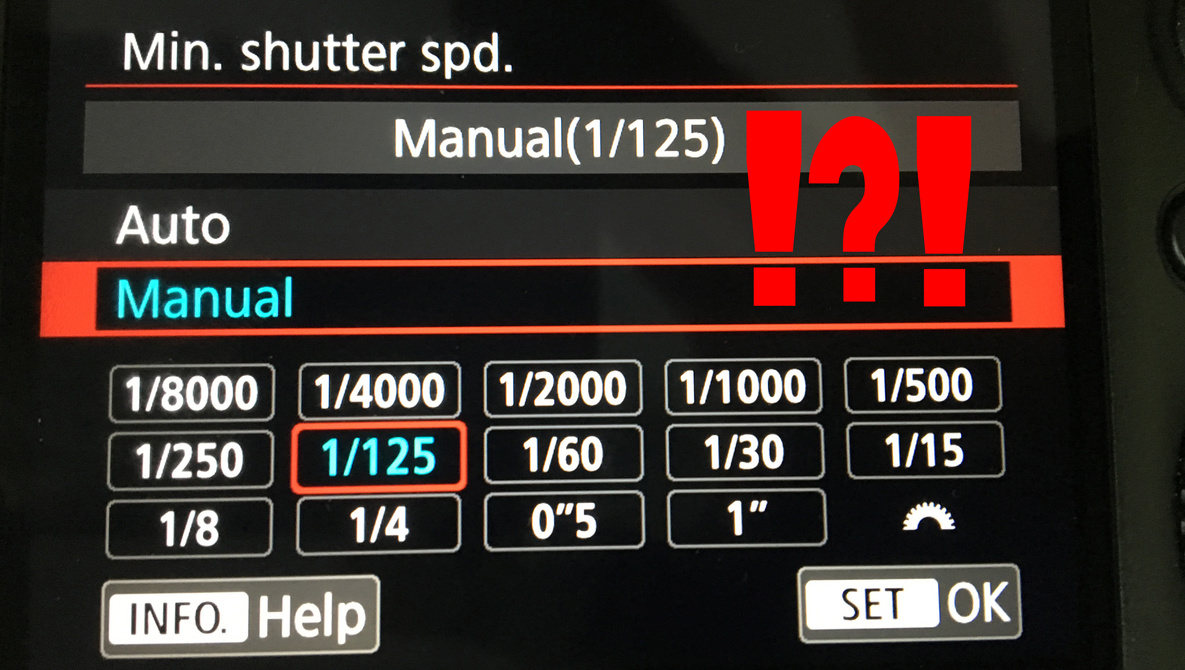
Do you ever get the feeling that people who make menu settings on cameras and manual instructions to follow are having a laugh at your expense by making things so confusing? Can you explain this Canon menu riddle to me? Because it’s baffling me.
Call me old fashioned or even plain and simple, but if I look at the menu settings on a camera and I see something that I can change and tinker with to suit my preferences, then I kind of expect that option to stick once I’ve pressed the save button. Normally, my prehistoric wishes are catered to by the good folk at Canon, but I’ve recently (re-)found something that has left me rather confounded and flustered. In a recent article here on Fstoppers, a reference was made to the use of Auto ISO, the advantage being that when you set up the Auto ISO feature in your menu settings, you can also set the minimum shutter speed value, among other things. Take a look at the image below for a clearer picture of what I’m referring to.

In my Canon 5D Mark IV, you go to the red menu and select the second sub-menu, called “SHOOT2.” From there, you can select ISO speed settings, as seen above. Once you click that picture, you get the options seen in the image below.

From there, you select Auto, giving the camera the ability to choose what it deems the best ISO settings for you when you’re out shooting so that you can get a correctly lit exposure. As the picture above suggests, you can also set the ISO range for both stills and the Auto setting. For the purposes of experimentation, I set both to 6,400 rather than the default 12,800. I don’t like shots at ISO 12,800 anyway and feel that for my own needs, shots taken with such a high digital noise factor are seldom useable. But it’s the bottom setting that I was most interested in: minimum shutter speed. Once you press that, you get the option of choosing the minimum shutter speed you’d like the camera to keep in certain circumstances.

As you can see, you get a lot of options to go with. I chose 1/125th of a second, because I need that speed to keep my subjects relatively sharp. The only time I’m really shooting in the dark where I need to bump up the ISO is in and around shrines and temples here in Japan, which can often be very dimly lit. Using a flash doesn’t often go down too well with the locals or the monks, but I really don’t like bumping the ISO as high as 12,800. The problem is that sometimes, it can get so dark that if I’m in simple aperture priority mode and my lens isn’t fast enough, my camera makes the decision to either bump up the ISO to 12,800 and/or reduce the shutter speed to something so slow that it’s impossible to get a crisp, sharp handheld image of my subject. So, the idea of setting a minimum shutter speed in the menu was very appealing to me, despite the obvious risks that might come with it in low-light situations.
The picture I had in my mind when I went through this menu process on my 5D Mark IV was that the camera would follow my saved settings and do me the courtesy of adhering to the wishes I’d manually entered. Oh, how stupid of me. When I took a few test shots, I was left dazed and confused. I checked my saved settings once again. ISO 6,400, check. Minimum shutter speed, 1/125th of a second, check. Aperture wide open, check. I took three shots in dark settings, and each time, I got the same result: the camera had not obeyed my wishes! See what I mean in the image below.

You can see from the red circles that the camera did indeed keep the ISO to a maximum of 6,400, but it did not keep the shutter speed to a minimum of 1/125th of a second. I deliberately chose a lens that wasn’t particularly fast just to test this out. So basically, what happens is (in my nicest possible words) the camera doesn’t give a toss about the settings you’ve manually entered and saved and does what it wants. To hell with the user, it’s all about me, the camera! I looked around the web and discussed the issue with fellow Fstoppers writers, and it seems that the camera does indeed override the settings you’ve entered and saved. Say what?
Yes, the theory being (according to those defending this mutinous behavior by the camera) that the camera’s main job is to give you an image that is exposed correctly. Therefore, if the camera deems that there is not enough light via the aperture or the parameters you’ve set for ISO, it will reduce the shutter speed so that you do get enough light. It was interesting to me that people seemed to be split on this. To me, I’m emphatically against a camera overriding my settings.
If the option is there for me in a menu to enter values that I want and the option is there for me to save those values, then the camera should follow the values I’ve entered. If I get an underexposed image that looks like it was taken deep inside someone’s pocket, so be it. That’s on me and my settings. But to hell with the idea that the camera can override my own choices and do what it thinks is best for me and my image. That would be like a satellite navigation system giving you five options to choose from on your route from A to B. So, you choose option two for whatever reason, then halfway through the drive, you suddenly realize that your navigation has redirected you to route four without telling you. Thanks, but no thanks.
Of course, you could say that I should enter a higher value for my maximum ISO settings or use a faster lens, but that’s not the point. The point to me is that if your camera’s menu gives you the option of selecting particular options and saving them, then the camera should follow those settings, regardless of whether your image comes out correctly exposed or not. What do you think? Are you happy for the camera to override your own custom settings and make choices for you? Or would you be as (faux) angry as me?
Let me know in the comments below. And also, does this happen with other makers, such as Nikon and Sony? Or is it just a Canon thing?