

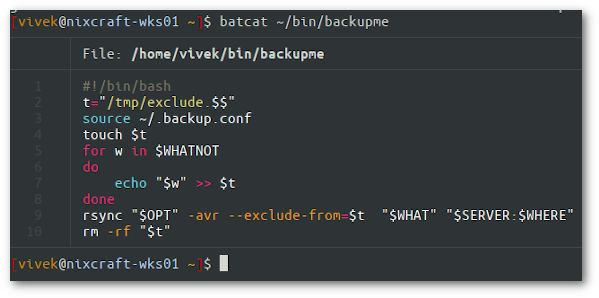
The cat (short for concatenate) command is one of the most frequently used flexible commands on Linux and Unix-like operating systems. Say hello to bat Linux command, which is a cat command written in Rust programming language. The bat command comes with syntax highlighting, git integration, and works as is a drop-in cat command replacement. Let us see how to install bat on Linux and Unix system for fun and profit.
Say hello to bat Linux command
Let us see some cool features of bat command:
- Syntax highlighting – Bat supports syntax highlighting for a large number of programming and markup languages.
- Git integration – Bat communicates with git to show modifications in left side.
- Automatic paging – The command can pipe its own output to less if the output is too large for one screen.
- Display and highlight non-printable characters.
- A user-friendly command-line interface.
- And of course, for file concatenation, including all of the cat command functionality.
Installation
We need to use the system package manager. Let us see some famous Linux distro examples for installing bat command. First open the Terminal application and then type commands as per your operating systems.
Installing bat on Ubuntu and Debian Linux
Simply run the following apt command/apt-get command:$ sudo apt install bat
[sudo] password for vivek:
Reading package lists... Done
Building dependency tree
Reading state information... Done
The following additional packages will be installed:
  libgit2-28 libhttp-parser2.9 libmbedcrypto3 libmbedtls12 libmbedx509-0
The following NEW packages will be installed:
  bat libgit2-28 libhttp-parser2.9 libmbedcrypto3 libmbedtls12 libmbedx509-0
0 upgraded, 6 newly installed, 0 to remove and 4 not upgraded.
Need to get 2,274 kB of archives.
After this operation, 6,279 kB of additional disk space will be used.
Do you want to continue? [Y/n] y
Get:1 http://archive.ubuntu.com/ubuntu focal/universe amd64 libhttp-parser2.9 amd64 2.9.2-2 [21.8 kB]
Get:2 http://archive.ubuntu.com/ubuntu focal/universe amd64 libmbedcrypto3 amd64 2.16.4-1ubuntu2 [150 kB]
...
Fetched 2,274 kB in 4s (583 kB/s)
Selecting previously unselected package libhttp-parser2.9:amd64.
(Reading database ... 285273 files and directories currently installed.)
Preparing to unpack .../0-libhttp-parser2.9_2.9.2-2_amd64.deb ...
Unpacking libhttp-parser2.9:amd64 (2.9.2-2) ...
Selecting previously unselected package libmbedcrypto3:amd64.
Preparing to unpack .../1-libmbedcrypto3_2.16.4-1ubuntu2_amd64.deb ...
Unpacking libmbedcrypto3:amd64 (2.16.4-1ubuntu2) ...
...
Selecting previously unselected package bat.
Preparing to unpack .../5-bat_0.12.1-1build1_amd64.deb ...
Unpacking bat (0.12.1-1build1) ...
Setting up libmbedcrypto3:amd64 (2.16.4-1ubuntu2) ...
....
Setting up bat (0.12.1-1build1) ...
Processing triggers for man-db (2.9.1-1) ...
Processing triggers for libc-bin (2.31-0ubuntu9) ...
Alpine Linux
Execute the apk command$ sudo apk add bat
Arch Linux install bat
Run the pacman command:$ sudo pacman -S bat
Fedora Linux user try the following dnf command
sudo dnf install bat
On Gentoo Linux
We can use the emerge command:$ sudo emerge sys-apps/bat
For Void Linux
Try the xbps-install:$ sudo xbps-install -S bat
FreeBSD install bat with the help of pkg command
$ sudo pkg install bat
Of course. FreeBSD users can build it from the FreeBSD ports too:# cd /usr/ports/textproc/bat
# make install
openSUSE user try the zypper command
$ sudo zypper install bat
Apple macOS Unix users try any one of the following method
You can install bat with Homebrew:brew install bat
Or install bat with MacPorts:port install bat
MS Windows users
Open Windows prompt and type:choco install bat
## OR ##scoop install bat
Using bat on Linux and Unix
Like cat command, bat often works out-of-the-box on Linux or Unix. No extra configuration needed. So all you have to do is type:batcat filename
bat filename
Please note that on some distros it is called batcat to avoid confusion with other tool named bat. For example let us try to display a file named ~/bin/backupme$ batcat ~/bin/backupme
$ bat ~/bin/backupme
Conclusion
In this quick post, we learned about installing and using bat command on Linux and Unix-like systems using the CLI. Bat is a perfect modern tool for desktop users, but I won’t install it on my servers. Give it a try and let us know what you think about the cool tool written in Rust programming language.