


Dark Mode
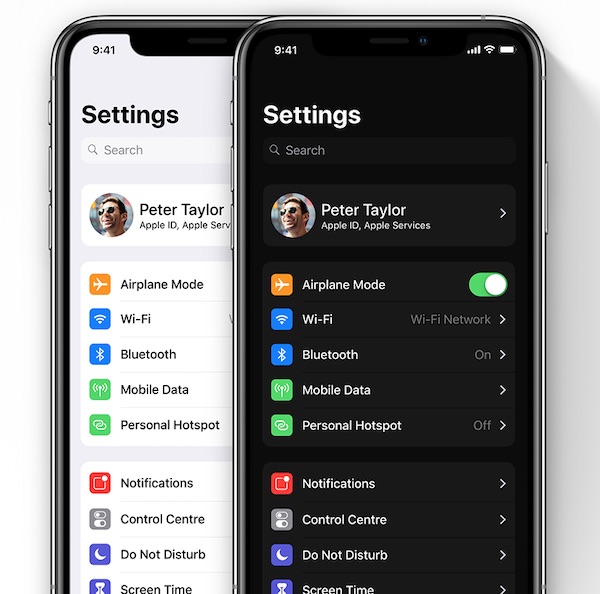
iOS 13 will include a dark mode for the first time, a feature iOS users have desired for quite some time. The dark mode will match the dark mode that was first introduced on macOS Mojave and it will allow for “easier nighttime viewing.” Apple’s WWDC artwork this year has a darker theme, perhaps hinting at the upcoming dark mode that we can expect to see in iOS 13.

Sleep Mode
Apple is working on a sleep mode available in the Control Center that will toggle on Do Not Disturb, make the Lock screen darker, and mute all incoming notifications. It will also include improvements to the Bedtime tab in the Clocks app.
iPad Tweaks
Several features in iOS 13 will be focused on the iPad. Apple is said to be introducing a feature for displaying multiple windows in a single iPad app using a tab view.
Improved multitasking is coming to iOS 13, with iPad apps to support multiple windows and stackable cards within apps. Apps will feature sheets that are initially attached to a part of the screen, but that are able to be detached with a drag gesture to become a card that can be manipulated.
Cards can be stacked on top of one another and a depth effect will indicate the cards on top and the cards on bottom, while flinging a card will dismiss it.
New Gestures
iPads are expected to gain a new standard undo gesture for text input, which will allow users to undo or redo an action using a three finger tap on the keyboard area and a slide left or right.
New gestures that will allow users to select multiple items in table views and collection views will be added, allowing them to drag multiple fingers on a list of items to draw a selection, similar to a click and drag in Finder on the Mac.
Updated Volume HUD
iOS 13 is rumored to include a new volume HUD that’s perhaps going to be less obtrusive than the current one.
Cross-Platform iOS and Mac Apps
With iOS 12 and macOS Mojave, Apple introduced a new framework for bringing iOS apps to the Mac, and as a test, several iOS-only Apple apps, such as Stocks, Home and Voice Memos, were ported to macOS. In iOS 13 and macOS 10.15, Apple is planning to expand this functionality to developers, which will make it easy for iOS apps to be tweaked for porting to the Mac.
App Changes and Updates
Messages
Updates to the Messages app will include a WhatsApp-style feature allowing users to create a profile picture and display name, and then choose who sees it. There will also be a dedicated menu for Animoji and Memoji stickers.
The Mail app will organize messages into searchable categories like marketing, purchases, travel, “not important,” and more, plus there will be a read later queue, an option to mute incoming Mail notifications for specific email threads, and a tool for blocking contacts.
New Find My iPhone App
Apple is working on a new app that combines Find My Friends and Find My Phone into one, which could potentially debut in iOS 13 and macOS 10.15. The app will include a new “find network” feature for allowing Apple devices to be tracked even when not connected to Wi-Fi or a cellular network by leveraging other nearby devices.
The app will include existing Find My iPhone features like Lost Mode and an option to remotely wipe a device. Location-based sharing options pulled from Find My Friends will also still be available.
Apple is also said to be working on a related hardware product, described as a Tile-like item tracker. It has been described as a “tag” that can attach to any item and paired to a user’s iCloud account. It will rely on proximity to the iPhone, with users receiving an alert when their device gets too far from the tagged item. There is no word on when Apple might debut this accessory, but it could come in the fall alongside new iPhones.
Maps
An updated Maps app will include features that will make it easier to set and navigate to frequent locations, like home or work addresses. Frequent locations will also be grouped more efficiently, and photos will be able to be added to them.
Reminders
A new Reminders app will feature four default sections laid out in a grid, encompassing tasks to be finished today, all tasks, scheduled tasks, and flagged tasks.
Books
The Books app will include a new progress tracker and a rewards system for encouraging more reading.
Home
The Home app will be better integrated with security cameras and will offer a feature for viewing past recordings without having to access a third-party app.
Health
The Health app will feature an improved view of daily activity and more comprehensive tracking of menstrual cycles. A section for “hearing health” will be included, measuring how loud you play music on your headphones or the volume of the ambient environment around you.
Other New Features
Speed Enhancements and Bug Fixes
iOS 13, much like iOS 12, will introduce speed improvements for devices and cut down on bugs.
Keyboard
There will be a new default swipe-based keyboard available, similar to something like SwiftKey.
Fonts
Font management will improve in iOS 13, with the Settings app to gain a new font management menu.
Updated Share Sheet
The Share Sheet interface for sharing photos and web links is going to be smarter in iOS 13, suggesting people to send content to.
Safari
Safari in iOS 13 on iPad will automatically load a desktop version of websites when necessary, and Apple is testing a downloads manager for Safari that would let users access downloads in a single location.
Live Photos Updates
Apple plans to double the length of the video that’s attached to a Live Photo, going from three seconds to six seconds.
Hey Siri
Hey Siri is going to get better at filtering out ambient noises like laughter and crying babies.
Screen Time
Screen Time will get a new feature limiting who kids can and can’t contact at specific times.
Interface Updates
There will be a new animation when launching the multitasking pane along with closing apps, and the iPad’s Home screen is getting some changes.
Revamped Files App
While there are few details on what a revamped Files app will look like, Apple is said to be working on new features for it, such as better third-party software integration.
New Emojis
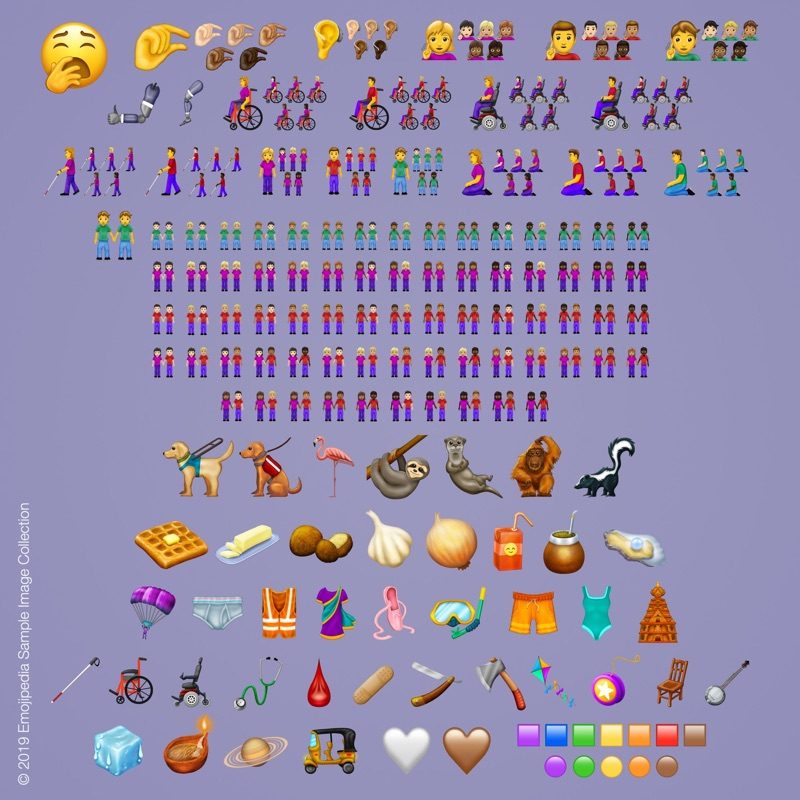
New emoji won’t be available when iOS 13 is released, but in an iOS 13 update later in 2019, Apple will introduce new characters. The Unicode Consortium has finalized the characters that are being added to the emoji standard, and some of them include flamingo, otter, waffle, sloth, white heart, people holding hands, ice cube, snorkel, orangutan, juice box, falafel, and more.
Accessibility
A more comprehensive Accessibility menu is coming to the main page of the Settings app with improved hearing aid support and more.
Mouse Support on iPad Pro
Rumors suggest Apple may be planning to add USB mouse support to the iPad Pro as an accessibility feature, without the need to use an adapter.
The iPad Pro’s USB-C port will reportedly allow you to plug in a USB mouse as an alternative input method for those unable to use a touchscreen. It’s not clear when this feature might be implemented, but it could come as early as iOS 13.
Developer Additions
For developers, iOS 13 will bring improved Siri integration for media playback, search, voice calling, event ticketing, message attachments, flights, and more.
Other developer-focused features include ARKit improvements with a new Swift-only framework for augmented reality and a companion app that will let developers create augmented reality experiences visually. ARKit will also support game controllers and stereo AR headsets.
New frameworks for expanded use of the Taptic Engine will be included, as will document scanning support for third-party apps and the ability to capture photos from external devices without having to use the Photos app.
NFC will be improved and developers will be able to add support for expanded NFC formats to their apps, and there is an updated version of CoreML being added.
Compatibility
There have been a few questionable rumors suggesting iOS 13 will drop support for older devices like the iPhone 5s, iPhone 6, iPhone 6 Plus, iPhone SE, original iPad Air, and iPad mini 2, but it’s not clear if this information is correct.
The iPhone SE uses the same A9 chip as the iPhone 6s and the fifth-generation iPad, which are not included in the list of devices rumored not to support iOS 13, which doesn’t make a lot of sense.