


Want to find out who did a tapback on an iMessage? Follow along for how to figure out exactly who tapped back with what expression in a couple of steps.
Tapbacks are a fun and fast way to respond to iMessages whether its just text, a photo, or video with expressions like thumbs up or down, a heart, or exclamation marks. But especially if you’re in a group message, it can be tricky to keep track of who’s responding with tapbacks.
How to see who did an iMessage tapback on iPhone
- Open the iMessage you want to check
- Long press on the message with a tapback or tapbacks
- You can tap on the people who have used a tapback to see more info (useful if multiple people have done a tapback on the same message, photo, or video)
Use the same steps for iPad. For Mac, do a click and hold to bring up the tapback information.
Here’s how the process looks on iPhone:
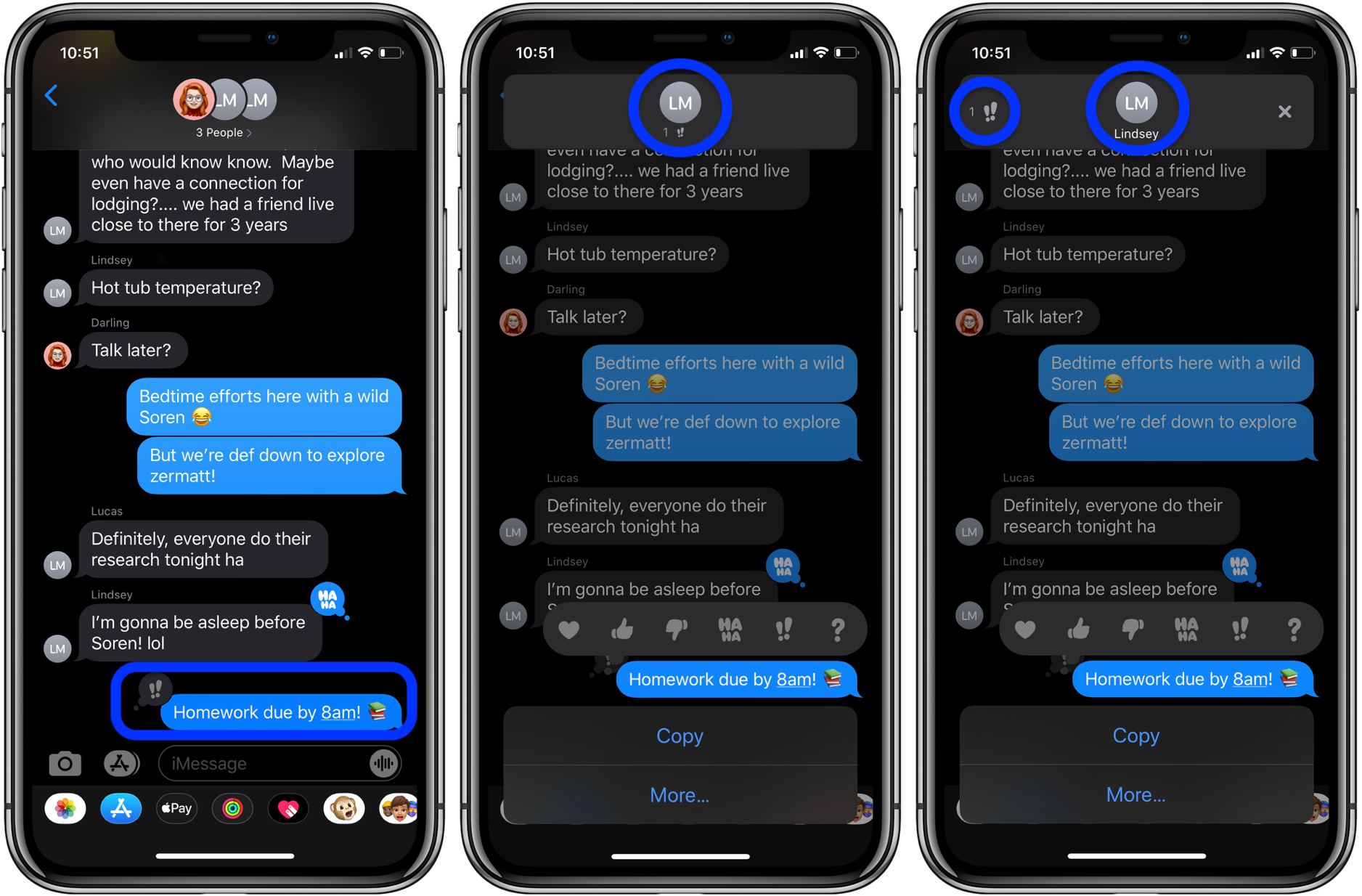
iPhone users can respond with tapbacks in SMS messages (with both Android and iOS users in the thread) but keep in mind Android users will just see a text translation of the tapback and not see it like it appears above.
Read more 9to5Mac tutorials:
AirPods Pro:
iPhone & iPad:
Mac:
FTC: We use income earning auto affiliate links. More.
Check out 9to5Mac on YouTube for more Apple news: