

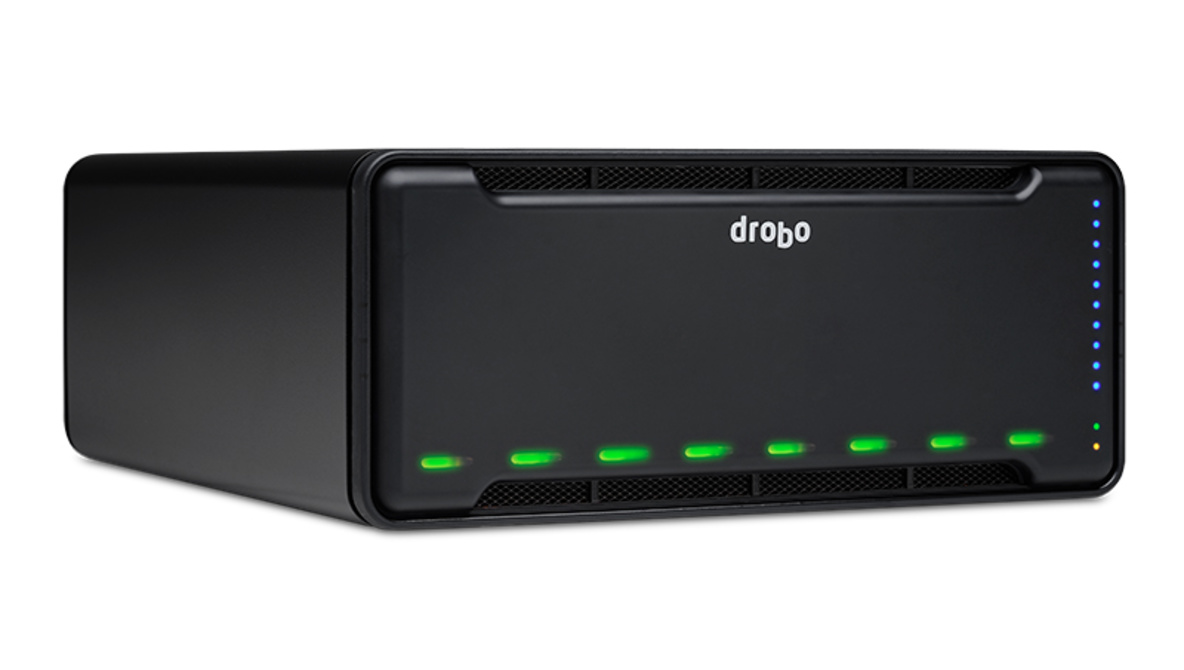
With dual Thunderbolt 3 ports, eight drive bays, and an optional SSD acceleration bay, Drobo’s 8D is its fastest storage array yet. But the benefits of Drobo aren’t necessarily in speed, but instead in its user-friendly BeyondRAID system that takes the complexity out of managing your RAID setup. If you don’t like thinking about your backup but like to trust it’s going to work for you at all times, this might be the way to go.
The Drobo 8D is big but sleek. The magnetically attaching faceplate seamlessly covers a system of front-facing LEDs that give you updates on the drive’s status, capacity, and warnings at all times. Redundant fans and a built-in backup battery offer further protection against overheating or data loss. Dual Thunderbolt 3 ports (cable included) for proper daisy-chaining round out a series of features you’d expect for a professional backup storage array, but it’s BeyondRAID that will be the motivating factor to make this your backup solution.
For the unfamiliar (and a reminder for the seasoned), traditional RAID arrays are great for basic redundant backup setups. However, they have some serious limitations that won’t hurt you until you need to overcome them. And the time will come. The worst part is it’s the inexperienced and less tech-savvy that will suffer the most because they’re understandably ill-prepared.
Traditional RAID systems are, generally speaking, not very flexible. What the layperson often doesn’t understand is if you want to add storage, you need to put a new drive into the array and redo a backup from scratch, overwriting all of your existing backups. Of course, the experienced techie with a dusted-over Sushi-boat-dish-stack of unused drives offering additional capacity at any moment will just grab a few of those, dust them off, and temporarily move any backups off the current RAID array so that information can be replaced once the new drive is in.
This isn’t something you think about if you’re the average working photographer with a modest 16 TB backup system. But one day, you’ll want to expand those eight 2 TB drives (or add a drive in your current system’s empty fifth bay alongside your four 4 TB drives). And I’m going to guess you don’t have a spare 16 TB of hard drives sitting around just dying to be used. How do I know? This was me literally right before this review.
Since relatively recently being more selective about the data I keep, I haven’t needed more storage in a long time. I’m fairly technology-oriented (I’m in the “ultra-light HTML is my limit” category), but my current RAID setup simply wasn’t something on my mind until I got a notification my backup drives were starting to get full. After digging around for all those spare drives I was sure I had, I came out virtually empty-handed with two old 1 TB drives and a dead 4 TB drive. Not enough. Ordering one or two gigantic drives to replace a couple existing options wasn’t possible because I wasn’t using BeyondRAID. I would have to order enough new storage to completely offload my current backup burden — oh, and I would need another multi-bay storage array that could read all of this data and deliver it back to the existing array. None of this was a problem for a single day in the last four years. But you can bet it was a problem now. But none of this would have happened with BeyondRAID.
The rest of this will be short, I promise. That’s because BeyondRAID is very simple. Imagine everything you’d like to do with a RAID array. You should be able to magically just put a new drive into an existing, empty storage slot and have it add storage to the existing array. You should be able to replace a drive or two with larger ones and have access to that added capacity. You should be able to change between single- and dual-disk redundancy as your needs change as long as you have the extra storage available for backup without needing to delete and rewrite your entire backups and without needing to know what RAID 0, 1, 5, 6, and 10 all mean. All of this is easy and user friendly with any of Drobo’s systems. And the Drobo 8D gives you eight bays of flexibility and expandability within which you can live in a virtual state of backup bliss.
Okay, so that sounds amazing. Nothing comes for free, though. As with anything, there are some drawbacks. In this case, Drobo isn’t the fastest system out there. If you ask me, it’s plenty fast for any backup needs. I only had half the number of drives active, and I was seeing speeds as high as 230 MB/s. That’s respectable, but it goes up to around 1 GB/s read speeds and write speeds in the 400 MB/s range with the help of more drives and an SSD as an acceleration cache drive in an additional bay in the back of the device — needless to say, it’s certainly not slow by any means. It’s also not cheap at $1,299, but neither is that out of the ballpark for a professional eight-bay system. And finally, its paltry 15 W power throughput on the Thunderbolt 3 cable leaves a little to be desired for would-be MacBook Pro single cablers. But most people probably have something like this plugged into a desktop dock anyway (as I did).
Things I Liked
- BeyondRAID is beyond useful (if you’re anything short of a computer pro, you may not known it, but you just want this)
- Plenty fast
- Great design — it’s probably the best-looking storage array out there
- Included Thunderbolt 3 cable
What I Didn’t Like
- Still a bit pricey, but reasonable for what you’re getting
- 15 W Thunderbolt charging is certainly lackluster
- Two-year warranty leaves more to be desired for a professional backup system (five years would have been nice to see)
Conclusion
When weighed together with the benefits, none of these drawbacks are a dealbreaker to me. It’s plenty fast for live work for 4K video (and certainly for backups), offers plenty of storage capacity with support for eight 16 TB drives (that’s 128 TB in this one box, which you can double by connecting two), and is still somewhat reasonably priced, especially considering all the extra storage I will not have to buy to expand my setup in the future without deleting all my current backups.
If you want to do this, I highly recommend getting the array and drives separately. Be sure to pair the Drobo 8D with Seagate Iron Wolf drives, Western Digital Red drives, or something similar that’s specifically made for NAS systems. This is a DAS (direct-attached storage), but the vibration optimizations and other features of NAS-specific drives were made for systems just like this. It’s the same difference, essentially, whether you’re connected to the Internet or not (speaking of which, Drobo, can we get a 10 GbE version of this?!).
The Drobo 8D will run you $1,294 at B&H, while drives will run you around $100 for 4 TB, $130 for 6 TB, $200 for 8 TB, and the list goes on. Some of those are on a limited time special that ends as soon as the weekend hits. The 6 TB drives are in a sweet spot at the moment, but it is likely well worth it to instead get some higher-density drives — even perhaps the 16 TB drives at $500 a piece — just to be able to give yourself maximum flexibility for future growth. That means a full system could cost you over $2,000, but that’s a small price to pay for peace of mind that should last you a decade or more. And if it doesn’t last you that long, nice work: that means business is good.